Understanding Neck and Shoulder Pain at the Desk
Neck and shoulder pain is common among office workers (Côté et al., Best Practice & Research Clinical Rheumatology 2008). If you spend most of your day at a desk, your cervical spine and shoulder girdle take a beating - your head is often held forward for hours, and everything tightens up.
Here’s the thing: your head weighs about 4.5-5.5 kg when it’s balanced directly over your spine. As it drifts forward, the demand on your neck muscles rises quickly. That “forward head posture” is incredibly common among computer users, and it is one of the reasons desk work can feel so punishing on the neck.
What Causes It
Most neck and shoulder pain at the desk comes down to a few culprits:
- Leaning toward your monitor forces the muscles at the back of your neck to work nonstop. They fatigue, and then they hurt.
- Without armrest support, your upper trapezius muscles contract all day just to hold your arms stable while typing. That’s the classic “shoulders creeping up to your ears” feeling.
- A rounded upper back (thoracic kyphosis) forces your neck to hyperextend so you can still see the screen. Your neck compensates for what your mid-back isn’t doing.
- Holding your arms in typing position with no support loads the entire shoulder girdle for hours.
- A screen that’s too low or off-center makes you flex or rotate your neck constantly. This one is easy to fix but often overlooked.
Key Chair Features That Help
Adjustable Headrest
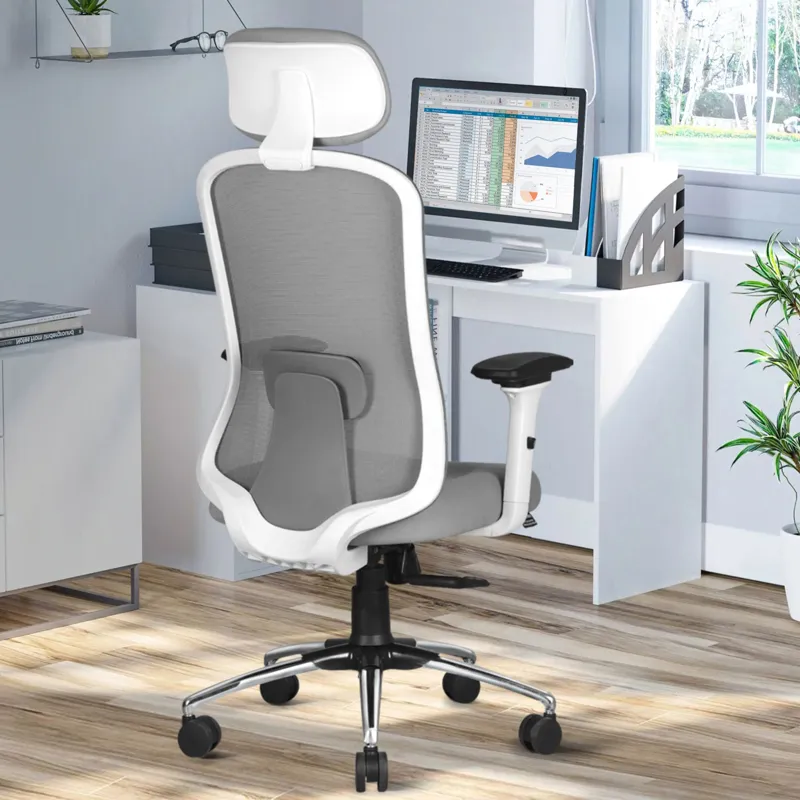
A headrest that adjusts in height and angle takes the weight of your skull off your neck muscles. The key detail: it should contact the back of your skull (the occiput), not press against your neck. Get this wrong and it actually pushes your head forward - the opposite of what you want.
Multi-Dimensional Armrests (3D or 4D)
Height, width, depth, and angle adjustability lets you position your forearms precisely. Office-work studies have shown that forearm support can reduce upper-trapezius muscle demand, which matters if your shoulders tighten up during the day (Rempel et al., Ergonomics 2006). 2D armrests are better than nothing, but 3D or 4D gives you the fine-tuning that actually matters.
High Backrest
You want a backrest that extends to at least your shoulder blades. This supports the thoracic spine and prevents the rounded posture that forces your neck to compensate.
Recline with Headrest Coordination
When you recline, a well-designed headrest follows the movement and keeps supporting your head through the full range. This lets your cervical spine decompress - it’s one of the best things you can do for your neck during the workday.
How to Set Up Your Chair
- Position the headrest to cradle the back of your skull. If it pushes your head forward at all, it’s too far out.
- Set armrest height so your forearms are parallel to the floor and your shoulders are completely relaxed - not shrugged up even slightly.
- Adjust armrest width so your elbows sit directly below your shoulders. Too wide and they’re useless.
- Start with a slight recline rather than forcing a rigid upright posture. Many people find this easier on the neck than sitting bolt upright all day.
- Position your monitor at arm’s length, with the top of the screen at or slightly below eye level.
- Get up and do neck stretches and shoulder rolls every 30-60 minutes. No chair setup replaces movement.
When to See a Doctor
Seek medical evaluation when:
- Pain persists beyond 4-6 weeks despite ergonomic corrections
- Pain radiates down one or both arms
- Numbness, tingling, or weakness in the hands or fingers
- Frequent headaches originating from the base of the skull
- Grinding, clicking, or locking sensations in the neck
FAQ
Do armrests really help with shoulder pain or are they mainly for comfort?
Yes, and it’s not just about comfort. EMG studies measuring muscle activity in the upper trapezius and deltoids show clear reductions when the forearms are supported. But here’s the catch: the adjustment matters more than having them at all. Armrests set too high push your shoulders up, which makes things worse. Too low and they do nothing. That’s why 3D or 4D armrests are worth the premium - they let you dial in the fit for your body.
Should the headrest be used while typing or only during breaks?
Honestly, this depends on you. Some people find that light headrest contact while sitting upright helps them maintain a neutral neck position. Others find it annoying and only use it when reclining during breaks. Both approaches work. The one thing that matters: the headrest should never push your head forward of your shoulders. Most adjustable headrests have enough range to accommodate either style.
Can an ergonomic chair fix forward head posture?
Not on its own. A good chair with a headrest and upper back support makes it easier to hold a neutral position, but if you’ve had forward head posture for years, you’ve got muscular imbalances that a chair can’t undo. You’ll need to actively strengthen your deep neck flexors and stretch your chest muscles. Think of the chair as the environment that supports the fix, not the fix itself. You really need both together.